Adaptive Offers
Adaptive Offers eliminates the guesswork from discount strategies by automatically optimizing discount amounts and durations for each customer. Instead of manually testing different offers or using one-size-fits-all discounts, Adaptive Offers uses AI to find the perfect balance between customer retention and revenue protection.
Overview
Traditional discount strategies often fail because they treat all customers the same. A 50% discount might save one customer while being unnecessarily generous to another who would have accepted 20%. Adaptive Offers solves this by:
- Maximizing retention with personalized discount amounts
- Protecting revenue by avoiding excessive discounts
- Improving efficiency through continuous optimization
- Reducing guesswork with data-driven decisions
For example, instead of offering every customer a fixed 30% discount for 3 months, Adaptive Offers might learn that newer customers respond better to 25% for 2 months, while long-term customers prefer 35% for 1 month.
How Adaptive Offers Works
Adaptive Offers continuously learns from customer behavior to optimize discount selection. The system operates in three key phases:
1. Data Collection
When customers interact with your Cancel Flow, the system tracks:
- Which discount amounts customers accept or decline
- How duration affects acceptance rates
- Patterns across different customer segments
2. Intelligent Optimization
Using advanced machine learning, the system:
- Identifies which discount combinations perform best
- Balances testing new options with proven performers
- Adapts to changing customer behavior over time
- Ensures each customer sees a consistent, optimized offer
3. Continuous Improvement
As more data becomes available, the system:
- Refines discount selection accuracy
- Discovers new optimization opportunities
- Maintains performance as your business evolves
Configuration
Setting up Adaptive Offers is straightforward and gives you complete control over your discount strategy while letting AI handle the optimization.
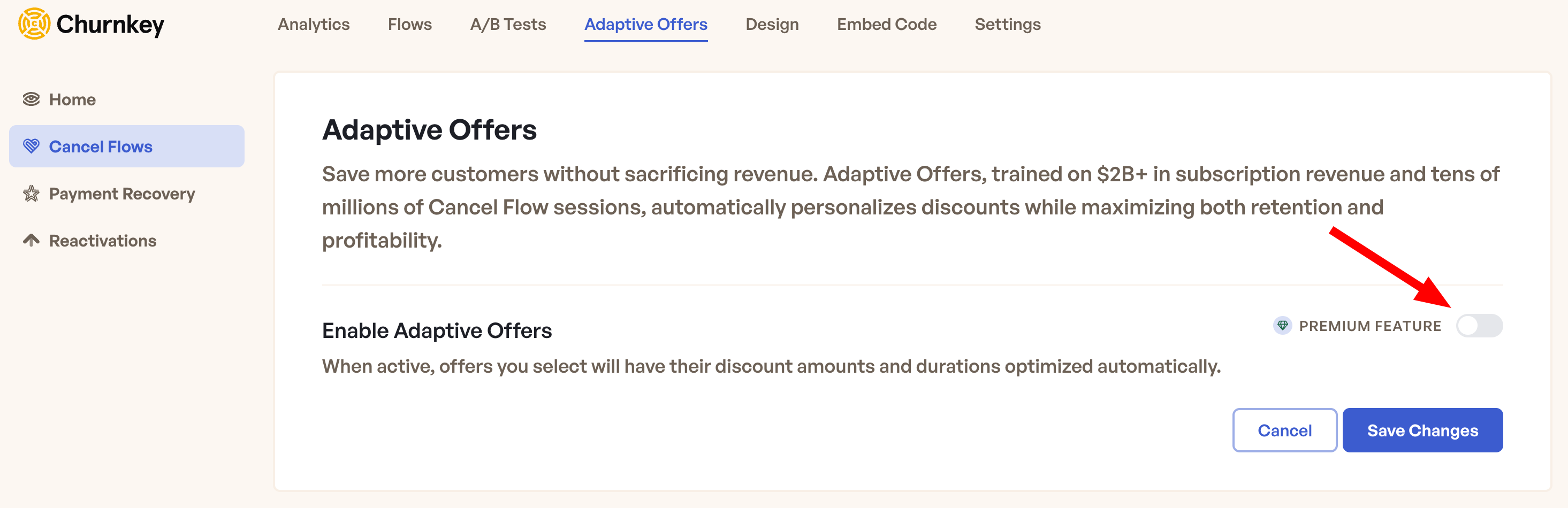
- Navigate to Cancel Flows in your Churnkey dashboard
- Access the Adaptive Offers section from the top navigation menu
- Toggle Enable Adaptive Offers to activate the feature
Discount Percentage Range
Configure the discount percentage boundaries that align with your business model and profitability requirements:
- Minimum Percentage: The lowest discount threshold (5-95%)
- Maximum Percentage: The highest discount threshold (5-95%)
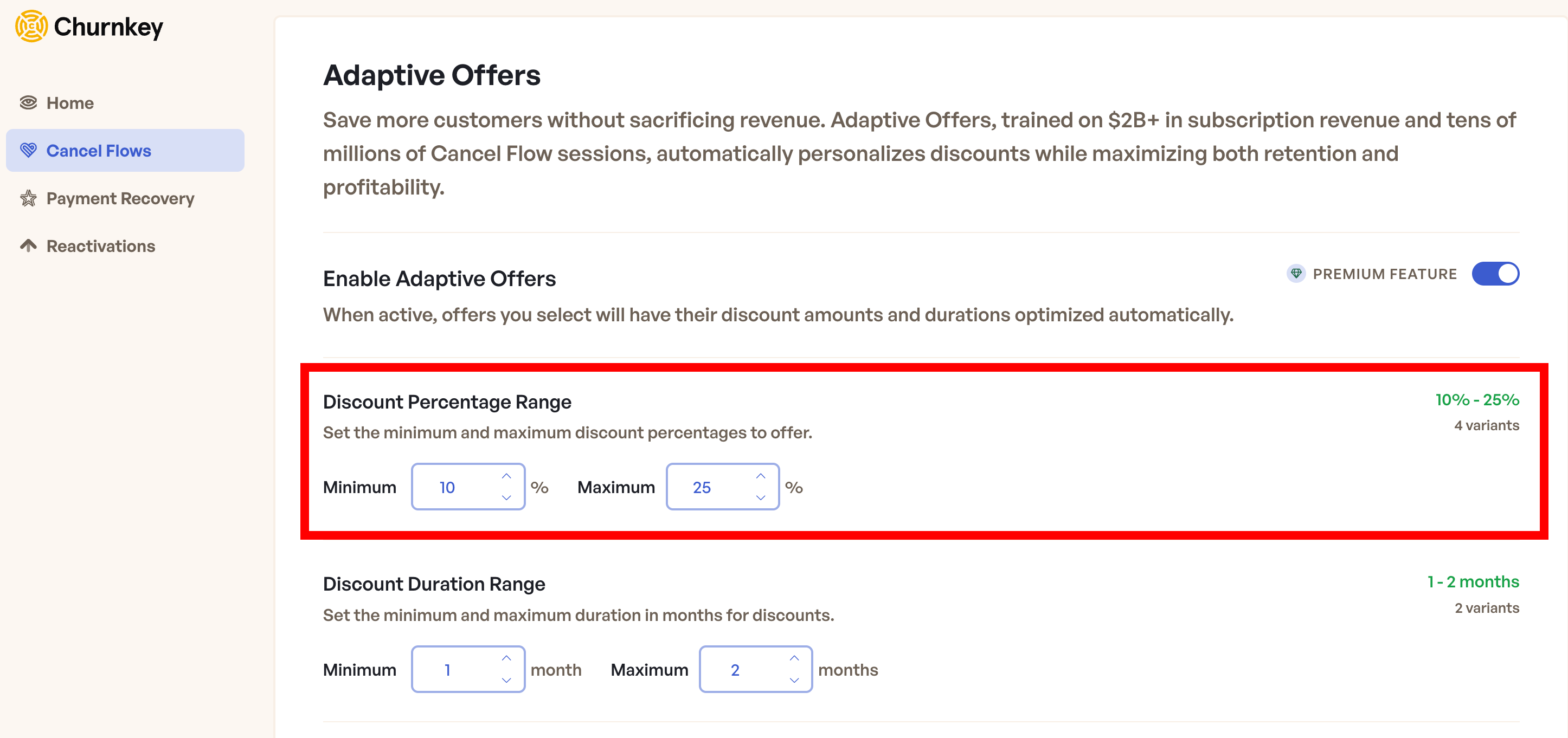
The system automatically creates discount options in 5% increments within your range.
Setting a 20% minimum and 40% maximum gives customers access to 20%, 25%, 30%, 35%, and 40% discounts. The AI will learn which percentage works best for different situations while staying within your comfort zone.
Discount Duration Range
Control how long your discounts should last:
- Minimum Duration: Shortest discount period in months (1-12)
- Maximum Duration: Longest discount period in months (1-12)
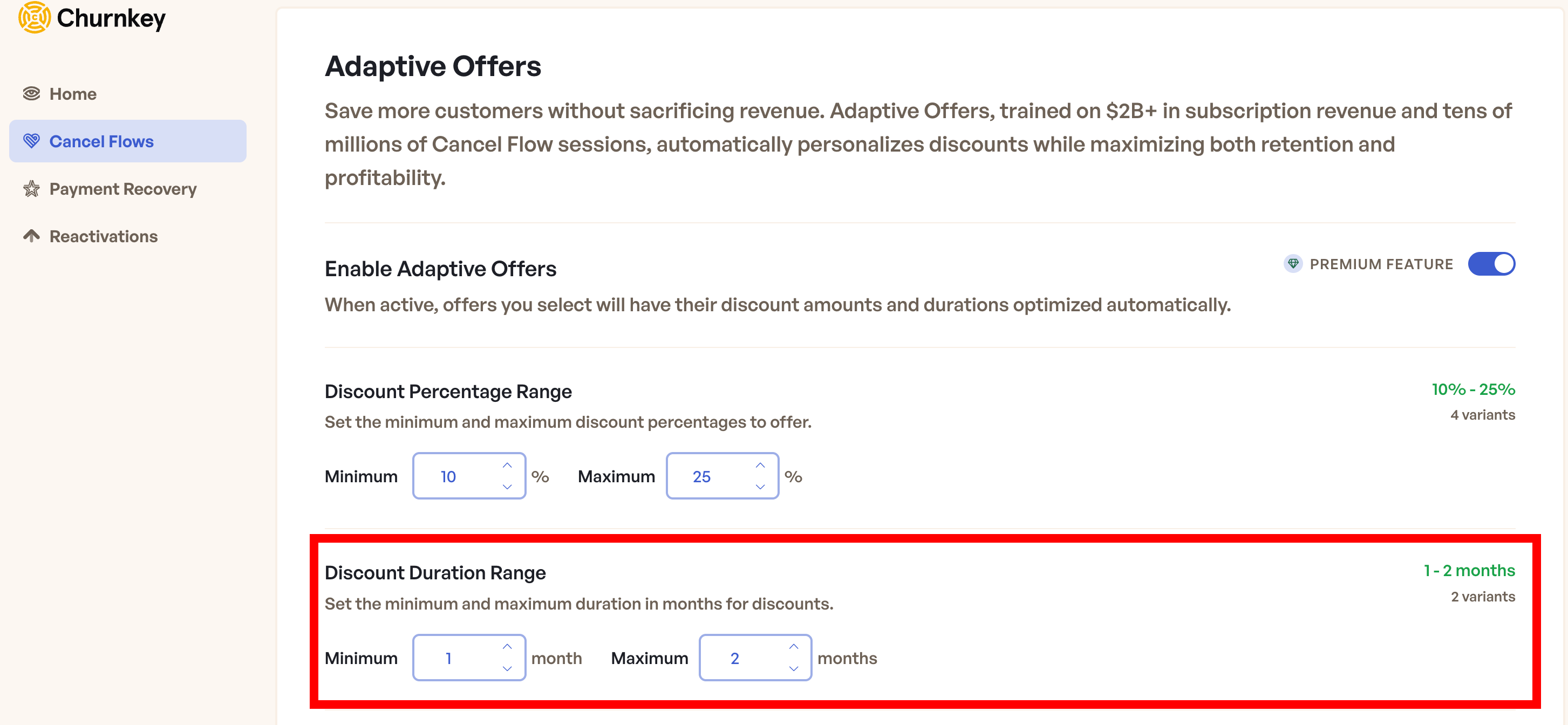
Duration options are generated in 1-month increments within your specified range. A configuration of 1-3 months produces three duration options: 1 month, 2 months, and 3 months.
Optimization Strategy
Choose a strategy that aligns with your business margins to define how aggressively the model should optimize discounts.
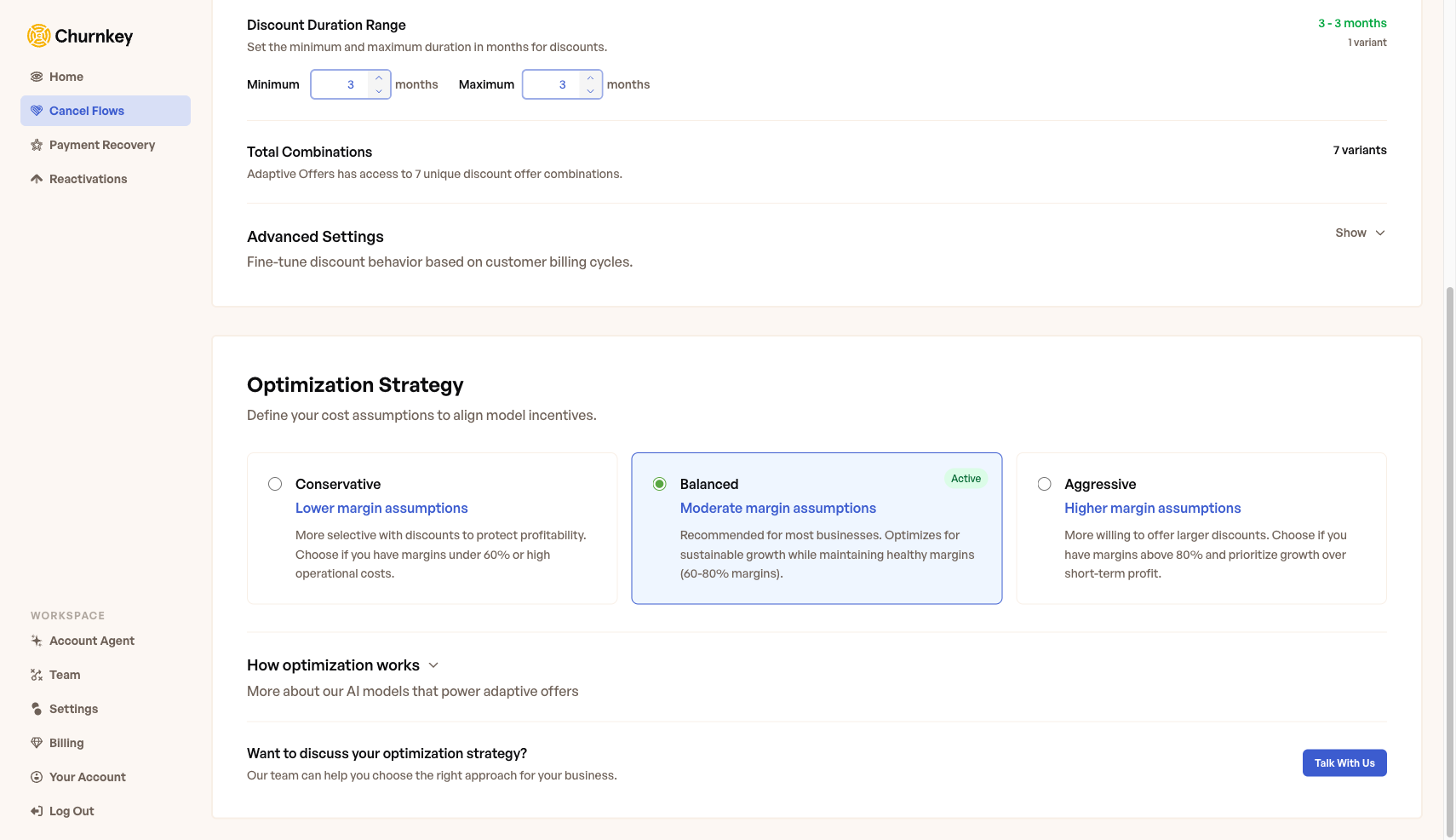
- Conservative: More selective with discounts, suited for margins under 60%
- Balanced (Recommended): Optimizes for sustainable growth with moderate margins (60-80%)
- Aggressive: More willing to offer larger discounts, for margins above 80%
Advanced Configuration
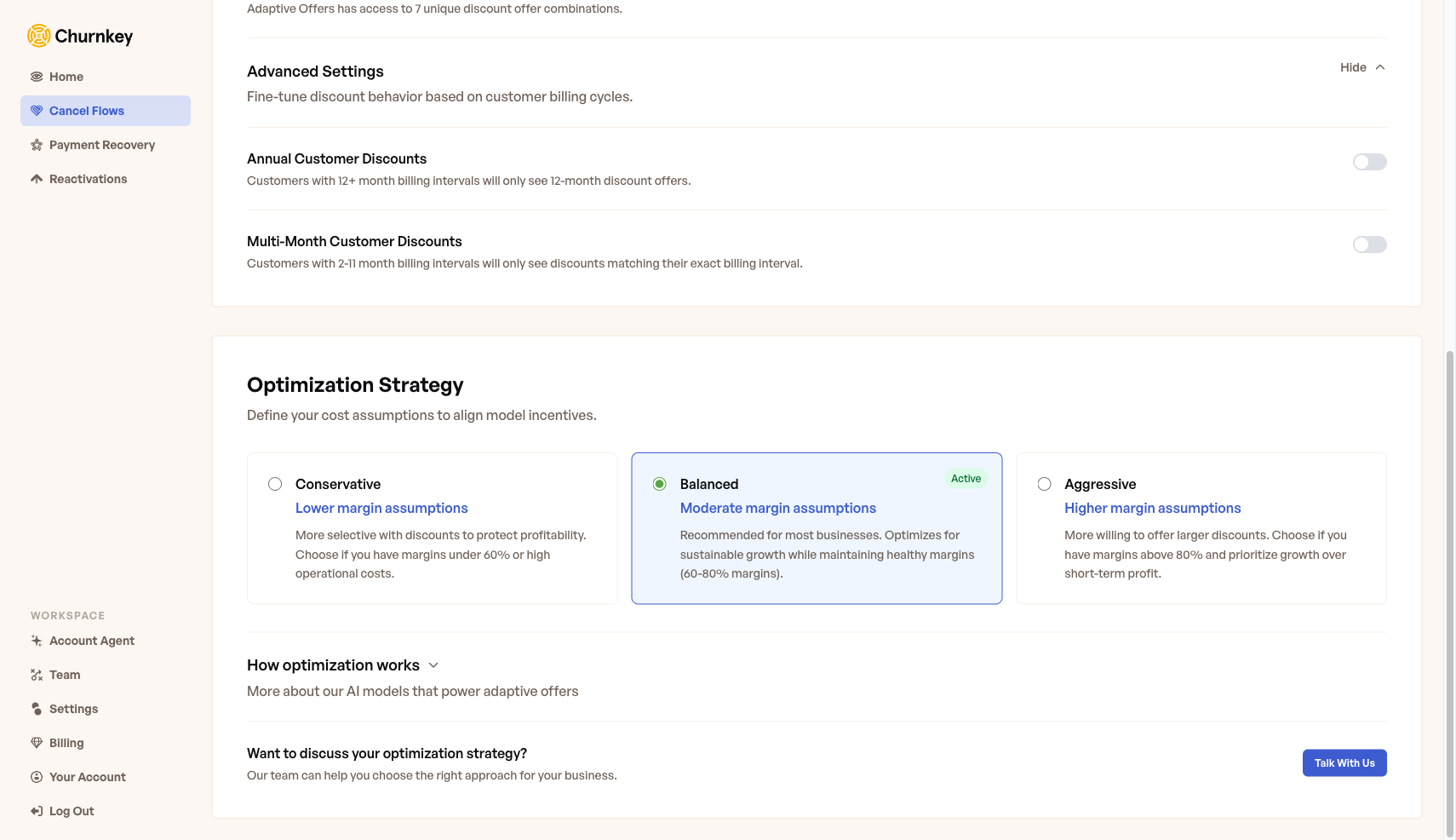
Annual Customer Discounts
Annual subscribers typically demonstrate different price sensitivity patterns and represent significantly higher customer lifetime value. When enabled, customers with 12+ month billing intervals will only see 12-month discount offers, ensuring the discount duration aligns with their billing cycle.
Enable Annual Customer Discounts in the advanced settings panel to activate this behavior. The system automatically applies a 12-month duration while still optimizing the discount percentage within your configured range.
Multi-Month Customer Discounts
When enabled, customers with 2-11 month billing intervals will only see discounts matching their exact billing interval. This ensures discount duration synchronization with existing customer billing cycles, creating seamless renewal experiences.
Enable Multi-Month Customer Discounts in the advanced settings panel to activate this behavior. The system automatically matches the discount duration to each customer's individual billing interval.
Metrics
Once Adaptive Offers is enabled and customers begin interacting with your Cancel Flow, performance data becomes available in the Adaptive Offers Performance section on the Analytics page under Cancel Flows.
Key Performance Indicators
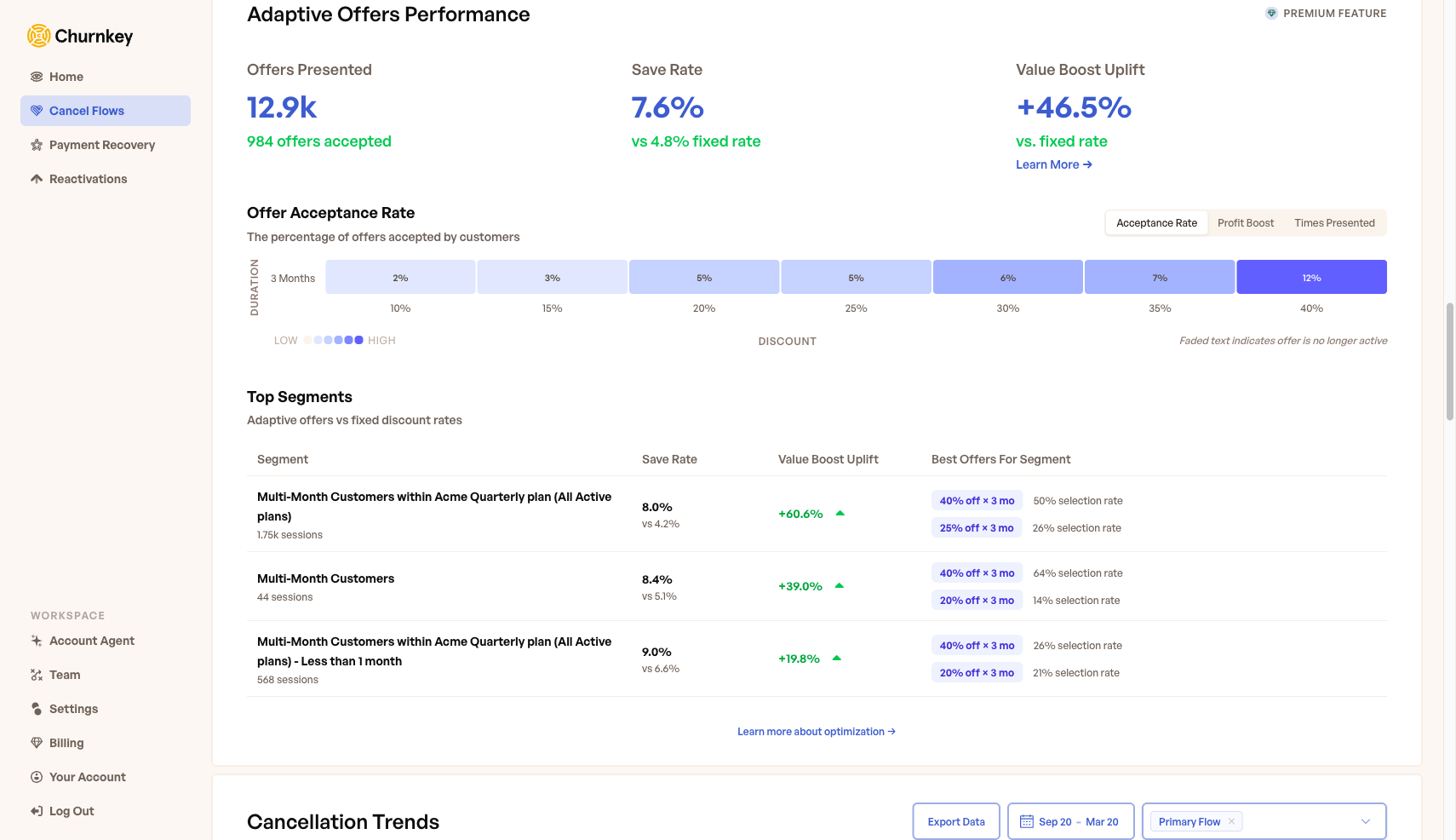
- Offers Presented: Total number of Cancel Flow sessions where Adaptive Offers were shown, along with the count of accepted offers
- Save Rate: The percentage of customers who accepted the optimized discount. This is shown alongside the equivalent fixed-rate baseline (e.g. "vs 4.8% fixed rate") so you can directly measure how much Adaptive Offers improves over a static discount strategy
- Value Boost Uplift: The revenue improvement percentage that Adaptive Offers achieves compared to a fixed discount strategy. Click Learn More for a detailed breakdown of how this metric is calculated
Offer Acceptance Rate
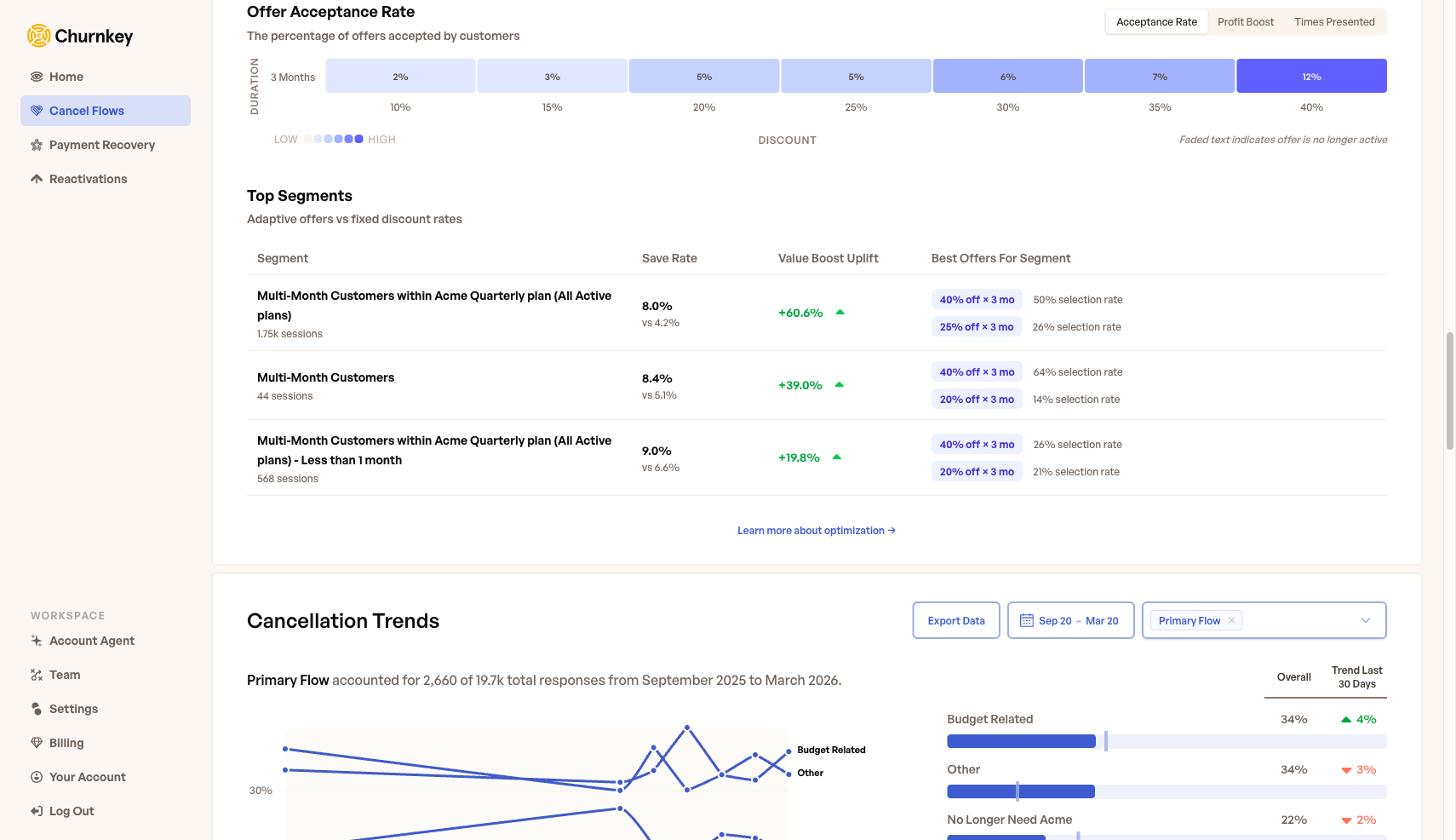
The heatmap visualizes how different discount combinations perform across two dimensions — discount percentage (x-axis) and duration in months (y-axis). Toggle between three views:
- Acceptance Rate: The percentage of customers who accepted each offer combination
- Profit Boost: Revenue impact after discount, based on your optimization strategy
- Times Presented: How frequently each combination was offered to customers
Higher-performing combinations appear in darker shades, making it easy to identify your most effective discount strategies at a glance.
Top Segments
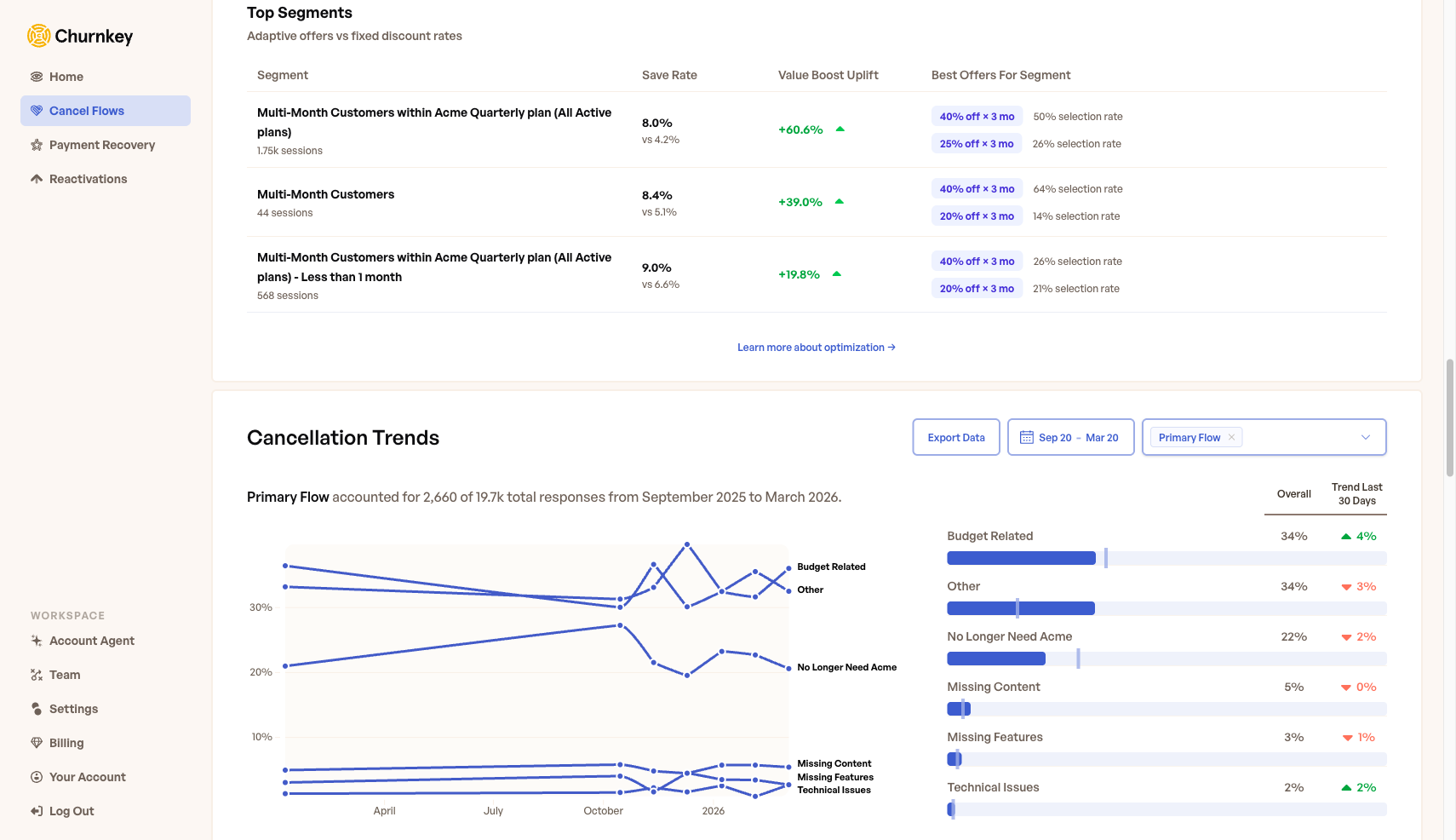
The Top Segments table breaks down Adaptive Offers performance by customer segment, based on billing interval and plan type. Each row shows the segment name along with the number of sessions observed. For each segment, you can see:
- Save Rate compared to the fixed-rate baseline (shown as "vs X.X%")
- Value Boost Uplift showing the revenue improvement percentage
- Best Offers For Segment — the top-performing discount combinations and their selection rates, so you can understand which offers resonate most with each customer group
A 2-Month Implementation Strategy
Phase 1: Initial Configuration (Week 1)
Step 1: Establish Conservative Boundaries
Begin with narrower discount ranges to minimize risk while gathering initial performance data. Configure percentage ranges that maintain healthy profit margins and align with your existing retention budget.
Step 2: Validate Technical Integration
Ensure your Cancel Flow blueprint includes discount offers and verify Adaptive Offers is properly enabled. Confirm automatic coupon creation is functioning correctly in your payment provider.
Phase 2: Data Collection Period (Weeks 2-3)
Step 3: Monitor Initial Performance
The system initiates comprehensive data collection across all configured discount combinations. During this phase, discount selection may appear random as the AI builds its foundational understanding of customer response patterns.
Step 4: Avoid Premature Adjustments
Resist the temptation to modify configuration settings during the initial learning period. Premature changes can disrupt the optimization algorithm and extend the learning timeline.
Phase 3: Optimization Emergence (Weeks 4-8)
Step 5: Observe Pattern Development
The AI begins favoring higher-performing discount combinations while maintaining exploration of underutilized options. Performance patterns become increasingly evident as statistical significance develops.
Step 6: Document Performance Trends
Track key metrics including save rates, revenue impact, and discount utilization patterns. Focus on overall trend analysis rather than daily fluctuations.
Phase 4: Ongoing Optimization (Months 2+)
Step 7: Implement Monthly Reviews
Establish regular performance assessments to evaluate optimization effectiveness and identify opportunities for range adjustments based on business requirements or market changes.
Step 8: Strategic Range Expansion
Based on proven performance data, consider expanding discount ranges to capture additional optimization opportunities while maintaining profitability thresholds.
Frequently Asked Questions
What are the minimum traffic requirements for effective optimization?
Our models are constantly improving and adapting - what works best in winter may not be best in summer, so the AI continuously adjusts to seasonal patterns and changing customer behavior. You'll typically see initial optimization within a week (after at least 20 sessions) with the model becoming increasingly effective over 4-6 weeks as it learns your unique retention patterns.
What is the expected timeline for measurable results?
Initial performance improvements typically manifest within 2-3 weeks of implementation, with substantial optimization occurring by 6-8 weeks. Timeline variation depends on traffic volume and customer diversity.
How does configuration modification affect ongoing optimization?
Discount range adjustments can be implemented at any time. However, as a good practice, we recommend changes to be done at least after a 2-4 week stabilization period.
What happens if a customer sees the discount offer multiple times?
Offer consistency is designed to maintain customer experience integrity and maximize conversion effectiveness. Once the system identifies optimal discount parameters for specific customer profiles, it maintains consistent presentation to ensure reliable and trustworthy interactions.